You've seen the message everywhere: "This website uses cookies" or "this site uses cookies." But what does it mean when a website uses cookies, and why should you care? Simply put, website cookies are small text files stored on your computer or phone when you visit a site. Every time you see that this website uses cookies notice, the site is letting you know it stores these files to remember you, your preferences, and your activity — but they also raise important questions about privacy and data protection.
Quick Answer: This Website Uses Cookies Meaning
When a site uses cookies, it means the website stores small data files on your device to:
- Remember your preferences: Language, theme, login status
- Track your activity: Pages visited, items in cart, browsing behavior
- Personalize your experience: Recommendations, targeted content
- Analyze site performance: How visitors use the website
Understanding cookies on websites is crucial for both users and website owners. Common questions include: does my site use cookies if I haven't added any tracking? Do all websites use cookies by default? Does my website have cookies from third-party scripts I forgot about? And what does enabling cookies mean for my visitors? In this comprehensive guide, we'll explore what cookies are, the benefits of cookies and disadvantages, how to know if your website uses cookies, and why website owners need to comply with regulations like GDPR and CCPA.
What You'll Learn
- What the "this website uses cookies" message means — and the website cookies meaning behind the banner
- How to check site cookies and find out what your site sets (3 simple methods)
- Benefits and risks of cookies for users and site owners
- Legal requirements for cookie consent (GDPR compliance)
- How to manage cookies on your browser
How to See Which Cookies Your Website Uses (Browser Method)
When you see a cookie banner, you might wonder what does cookies mean. Think of cookies as little notes a website leaves on your device. These notes help the site remember you and your preferences across visits.
Cookies in the browser are simple text files that store information such as:
- Your browsing activity: Which pages you visited, how long you stayed, what you clicked
- Your preferences: Language settings, theme choices (dark mode/light mode), font sizes
- Your login status: So you don't have to log in repeatedly on every page
- Shopping cart contents: Items you've added remain saved even if you close your browser
Types of Website Cookies
Understanding what cookies mean on a website requires knowing the different types. There are three main types of website cookies:
- Session Cookies: These are temporary cookies that your device deletes when you close your web browser. They help websites remember what you did during a single visit, like keeping items in your shopping cart as you browse different product pages.
- Persistent Cookies: These stay on your device for a specific time (days, months, or even years), even after you close your browser. They remember things like your login details, language preferences, or site settings for future visits.
- Third-Party Cookies: These are placed by websites different from the one you're currently visiting (like advertising networks or analytics services). They are often used for tracking your browsing across multiple sites and showing targeted advertisements based on your online behavior.
Link to Mozilla Firefox tracking protection: Mozilla Firefox tracking protection
Important: Third-party cookies are being phased out by major browsers due to privacy concerns. Google Chrome plans to eliminate them, following Firefox and Safari's lead in blocking them by default.
Does My Website Use Cookies? How to Check Cookies on a Website
Many website owners ask "does my site use cookies", "how do I know if my website uses cookies", or "which cookies does my website use". The answer is: probably yes, especially if you've added third-party tools like Google Analytics, social media widgets, or advertising scripts. Here are three methods to check what cookies a website uses and how to tell if a website uses cookies:
Method 1: Check Browser Developer Tools (Free & Instant)
The easiest way to check cookies on a website and see what cookies your website uses is through your browser's built-in developer tools:
- Step 1: Visit your website in any modern browser (Chrome, Firefox, Safari, Opera, or Edge)
-
Step 2: Open Developer Tools by pressing
F12(or right-click anywhere and select "Inspect") -
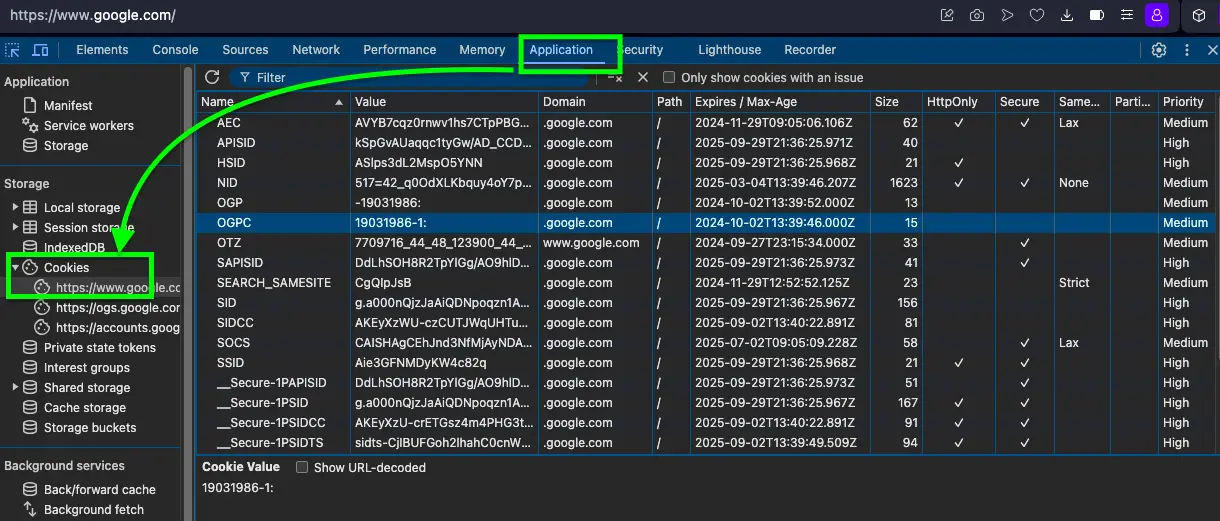
Step 3: Navigate to the storage section
- Chrome/Edge: Click the "Application" tab
- Firefox: Click the "Storage" tab
- Safari: Enable Developer menu first, then go to "Storage" tab
- Step 4: Look under "Cookies" in the left sidebar - you'll see all cookies your site sets, including their names, values, domains, and expiration dates
Method 2: Use Cookie Scanner Tools (Comprehensive Analysis)
For a more detailed analysis of which cookies your website uses — and to check what cookies a website uses beyond what DevTools shows — try these free cookie scanning tools that automatically detect and categorize all cookies:
-
CookieMetrix:
Scans your website and provides a complete list of all cookies with
their purposes, categories (essential, analytics, advertising), and compliance status.
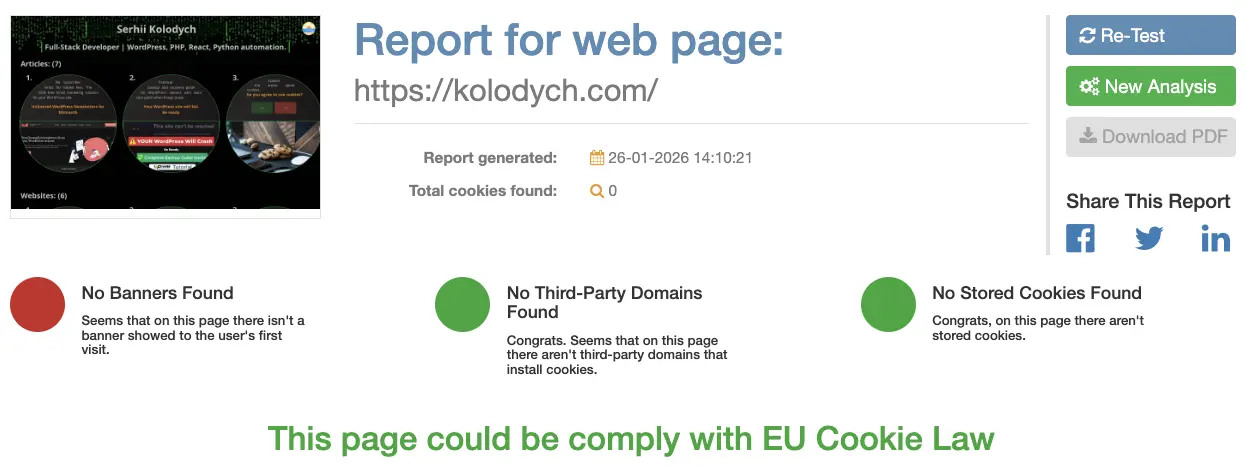
Screenshot showing cookies displayed in CookieMetrix on the Kolodych.com website. - OneTrust Cookie Compliance: Shows all cookies and helps with GDPR compliance by categorizing them and suggesting consent management solutions.
- Cookie Scanner by Secure Privacy: Free scan that categorizes cookies by type (first-party vs third-party) and purpose, with detailed reports.
- Browser Extensions: Tools like "EditThisCookie," "Cookie-Editor," or "Cookiepedia" let you view, edit, and manage cookies in real-time as you browse.
What These Tools Show You
- Complete list of all cookies (first-party and third-party)
- Cookie categories (necessary, analytics, marketing, preferences)
- Data collected by each cookie
- Cookie lifespan and expiration dates
- GDPR compliance assessment
Method 3: Review Your Privacy Policy & Installed Tools
Your site's privacy policy should list all cookies being used. If you're using any of these common tools, your site definitely uses cookies:
- Google Analytics - Tracks visitor behavior and site statistics
- Google Tag Manager - Manages multiple tracking scripts
- Microsoft Clarity - Records user sessions and heatmaps
- Facebook Pixel - Tracks conversions from Facebook ads
- Social media widgets - Share buttons, embedded posts, feeds
- Live chat tools - Intercom, Drift, Zendesk Chat
- E-commerce platforms - Shopping carts, checkout processes
- Email marketing tools - Mailchimp, ConvertKit tracking
If you've installed any of these services, you're using cookies. Check your privacy policy to ensure it accurately reflects all cookie usage.
If you're building a WordPress site and want to implement email marketing without cookies overload, check out my guide on free WordPress newsletter plugins that respect user privacy.
Does My Website Use Cookies? Platform-Specific Answers
The answer to "does my website use cookies" depends partly on what platform or CMS you built it on. Here's a quick reference to help you understand which cookies your website uses by default, based on the most popular platforms:
WordPress Sites
If your site runs on WordPress, it almost certainly uses cookies — even a freshly installed WordPress sets
cookies for logged-in users (wordpress_logged_in_*, wordpress_sec,
wp-settings-*). Once you add plugins like WooCommerce, Yoast SEO, or any analytics tool, the
cookie count grows quickly. To check cookies on your WordPress website, use browser
DevTools (F12 > Application > Cookies) while visiting your frontend as a logged-out user — that's what
your visitors see.
Shopify & E-commerce Stores
Shopify stores use cookies for cart persistence, checkout sessions, currency preferences, and third-party apps. If you run ads via Facebook Pixel or Google Ads, additional tracking cookies are loaded on every page. To check what cookies your Shopify site uses, run a scan with CookieMetrix or open DevTools while browsing your storefront. Your privacy policy must disclose all of them.
Static / Simple Websites
A plain HTML/CSS site with no third-party scripts and no login system may genuinely use zero cookies — making it one of the rare exceptions. However, if you embed a Google Analytics script, a YouTube video, a Google Map, or a social share button, this site uses cookies again. Always verify with DevTools even on simple sites. To understand which cookies does my website use and what cookies mean for your specific setup, run a quick check site cookies scan with CookieMetrix after any change.
Benefits of Cookies: Advantages for Users and Website Owners
Understanding the advantages of cookies helps explain why they're so widely used on the internet. The benefits of cookies extend beyond just convenience — they're essential for modern web functionality. Let's explore what do websites use cookies for and why they matter.
Cookies Advantages for Website Visitors
- Enhanced User Experience: Websites remember your preferences (language, layout, accessibility settings), making each visit smoother and more personalized. You don't have to reconfigure the site every time.
- Time Saved: No need to re-enter information or log in repeatedly to the same website. Session cookies keep you authenticated as you navigate between pages.
- Personalized Content: See content and recommendations relevant to your interests and browsing history. Streaming services suggest shows you'll like, news sites highlight topics you read about.
- Seamless Shopping: Your cart items stay saved even if you close the browser and come back hours or days later. You can research products across multiple sessions without losing your selections.
- Better Website Performance: Cookies help websites load faster by storing certain information locally instead of requesting it from the server every time. This reduces bandwidth usage and improves speed.
Benefits of Cookies for Website Owners
- Understanding User Behavior: Analytics cookies provide insights into how visitors use your site — which pages are popular, where users drop off, how long they stay, and what content engages them most.
- Improved Website Design: Data from cookies helps identify and fix usability issues. You can see where users struggle, which features they ignore, and what workflows need simplification.
- Increased Conversions: Personalization through cookies can lead to higher sales and engagement. Showing relevant products, remembering abandoned carts, and tailoring content to user interests all boost conversion rates.
- Effective Marketing: Track marketing campaign performance and ROI accurately. Know which ads drive traffic, which channels convert best, and where to invest your marketing budget.
- Customer Retention: Remember returning customers and provide them with personalized experiences that encourage loyalty and repeat visits.
For practical tools that help optimize website performance without overwhelming users with cookies, check out my essential web development tools that I use daily.
Importance of Cookies in a Website: With vs Without Comparison
The importance of cookies in website functionality becomes clear when you compare browsing with and without them. Here's what changes:
| Function | With Cookies | Without Cookies |
|---|---|---|
| Personalization | Your favorite items are recommended based on past visits. Example: "Because you viewed these shoes, you might like these running socks and athletic wear." | All recommendations are random and not based on your preferences. Example: "Here are some random products with no relevance to you." |
| Authentication | Stay logged in while you browse different pages and sections of the site. Example: "You remain signed in to your account across the entire website." | You need to log in again each time you move to a new page or section. Example: "Please log in again to continue to checkout / profile / settings." |
| Analytics | Website owners can track how users interact with the site to improve it continuously. Example: "We noticed 60% of users clicked on this feature, so we made it more prominent." | Limited data to understand user behavior, making improvements guesswork. Example: "No reliable data on how users interact with different features." |
| Advertising | Show ads relevant to your interests based on your browsing history. Example: "Ads for hiking gear after you searched for camping equipment." | Ads are generic and not tailored to your interests or needs. Example: "Random ads for products you have no interest in." |
| Shopping Cart | Items remain in your cart even after closing the browser and returning days later. Example: "Your 3 items from last week are still waiting for you." | Cart empties every time you close the browser or navigate away. Example: "Your cart is empty. Start shopping again from scratch." |
Disadvantages of Cookies: Potential Risks and Privacy Concerns
While the benefits of cookies are significant, it's equally important to understand the disadvantages of cookies. Cookies aren't without risks, especially concerning your privacy and security. Here's what you need to know about what does it mean when a site uses cookies from a privacy perspective:
Privacy and Tracking Concerns
- Cross-Site Tracking: Third-party cookies can track your online activity across different websites without your explicit consent. This tracking helps advertisers and data brokers build detailed profiles about your habits, interests, and online behavior. According to Privacy International, some tracking cookies follow you online collecting data to build profiles that can include personal details like age, family status, location, hobbies, job, financial situation, routines, brand preferences, search history, health concerns, and even political views.
- Intrusive Targeted Advertising: Based on your web browsing history, companies show you personalized ads. While sometimes relevant and helpful, this can feel invasive — like you're constantly being watched and followed around the internet. Ads can appear for things you only thought about or mentioned in private conversations.
- Data Sharing Without Consent: Cookies can share your data with dozens or hundreds of third parties (advertisers, data brokers, analytics companies) without your direct knowledge or clear consent, especially on sites with poor privacy practices.
- Behavioral Profiling: Over time, cookies build comprehensive behavioral profiles that reveal sensitive information about your health, financial status, relationships, beliefs, and vulnerabilities.
| Recent Search Activity | What Business Ads Will Be Shown to You |
|---|---|
| Financial Stuff | Ads for high-interest loans, debt consolidation services, payday lenders, or credit repair scams targeting financial vulnerability. |
| Relationships | Ads for expensive divorce lawyers, dating services with questionable privacy practices, relationship counseling, or misleading relationship advice products. |
| Political Topics | Ads for extremist political campaigns, controversial petitions, manipulative political propaganda, or divisive issue advocacy. |
| Health Concerns | Ads for unproven health supplements, aggressive medical treatment promotions, online pharmacies with dubious practices, or "miracle cure" products. |
| Travel Planning | Ads for timeshare schemes, overpriced travel packages, deceptive travel insurance offers, or vacation scams. |
Security Vulnerabilities
- Cookie Hijacking (Session Hijacking): If not secured properly with HTTPS and security flags, cookies in the browser can be vulnerable to theft. Attackers might steal these cookies (through techniques like man-in-the-middle attacks or cross-site scripting) to access your online accounts without needing your password. Example: A hacker on public WiFi could potentially intercept your session cookie, use it on their own device, and gain access to your logged-in accounts — viewing personal information, making purchases, or changing settings.
- Data Breaches: If a website is compromised in a security breach, stored cookie data could be exposed, potentially revealing sensitive user information, browsing history, or authentication tokens.
- Cross-Site Scripting (XSS) Attacks: Malicious scripts injected into websites can steal cookie data and send it to attackers, compromising user accounts and privacy.
- Cookie Poisoning: Attackers can modify cookie values to gain unauthorized access, escalate privileges, or manipulate website behavior in harmful ways.
Security Tip: Always browse on HTTPS sites (look for the 🔒 padlock icon), avoid public WiFi for sensitive activities, keep your browser updated, and use browser extensions that block third-party tracking cookies for better protection.
Legal Requirements: GDPR Compliance and Cookie Consent
When this website uses cookies, there are important legal obligations to consider. Understanding what does "this website uses cookies" mean legally is crucial for website owners. Laws like the General Data Protection Regulation (GDPR) in Europe and the California Consumer Privacy Act (CCPA) in the USA require website owners to be transparent about cookie usage and obtain proper consent.
Cookie Consent: What the Law Actually Requires
To comply with GDPR, CCPA, and similar privacy regulations, websites generally need to:
- Inform Users Clearly: Tell visitors that "this site uses cookies" through a cookie banner or notice that appears on their first visit. This notice must be clear, visible, and explain what cookies do in simple language — not legal jargon.
- Obtain Cookie Consent Before Tracking: Get the user's permission before placing non-essential cookies on their device. This is critical: you cannot use analytics, advertising, or tracking cookies until the user explicitly agrees. Pre-ticked boxes or implied consent don't count as valid consent under GDPR.
-
Provide Detailed Information: Have an updated privacy policy explaining:
- What types of cookies are used (essential, analytics, marketing, preferences)
- What data they collect (browsing behavior, IP address, device info, etc.)
- Why they collect it (improve user experience, analytics, advertising)
- How long cookies last (session vs persistent, specific timeframes)
- Who has access to the data (third parties, analytics providers, advertisers)
- Offer Control and Choice: Allow users to easily manage their cookie preferences — letting them accept all, reject all, or customize the types of cookies they allow. Users must be able to change their mind later and withdraw consent easily. The "reject" option must be as easy as "accept." Ensuring GDPR compliance is essential for building trust and avoiding hefty fines (up to €20 million or 4% of annual revenue).
- Essential Cookies Exception: Only strictly necessary cookies (required for basic site functionality like security, authentication, and remembering cookie preferences) can be set without consent. All other cookies need explicit permission.
GDPR Cookie Compliance Checklist
- Cookie banner appears on first visit
- Clear explanation of what cookies do
- "Accept" and "Reject" equally prominent
- No cookies loaded until user consents
- Easy way to change preferences later
- Privacy policy details all cookies used
- Cookie consent records stored securely
How Kolodych.com Uses Cookies: Real Example
On this website, tools like Google Tag Manager (for managing tracking scripts) and Microsoft Clarity (for understanding user behavior) are used. These tools help improve the site experience but also set cookies. Here's what cookies does my site use:
- Google Tag Manager: Helps organize and deploy analytics and marketing scripts efficiently. This tool may use cookies to track how users interact with the site, which pages they visit, and what actions they take. It allows for flexible tracking without editing site code directly.
- Microsoft Clarity: Sets cookies to gather anonymous data on user sessions—like clicks, scrolls, mouse movements, and page interactions. This helps identify usability issues, understand user behavior patterns, and improve the website design. Below is an example showing how Clarity can record sessions to understand user interaction:
This video shows a Microsoft Clarity session recording where the user interacts with various posts, moving the mouse around and clicking a few times on the background. This type of data helps website owners understand real user behavior. Please note: This video contains no spoken content or important audio elements.
By using these analytics tools, Kolodych.com can better understand visitor needs and continuously improve content, navigation, and user experience while being transparent about cookie usage.
Consequences of Non-Compliance
Failing to comply with cookie consent laws can result in significant penalties:
- GDPR Fines: Up to €20 million or 4% of global annual revenue (whichever is higher)
- CCPA Penalties: Up to $7,500 per intentional violation
- Reputation Damage: Loss of user trust and negative publicity
- Legal Costs: Expensive litigation and regulatory investigations
- Business Impact: Potential blocking of services in certain regions
Recent Examples: Google was fined €90 million in France for making it difficult to reject cookies. Amazon received a €746 million GDPR fine partly related to cookie consent practices. Compliance isn't optional—it's mandatory.
For WordPress site owners looking to minimize cookie usage while maintaining essential features like email subscriptions, consider using a self-hosted newsletter solution that keeps data on your server.
How to Check if a Website Uses Cookies
If you're wondering how to check if a website uses cookies, the quickest way is through your browser's built-in developer tools. This method works on any site — whether it's yours or someone else's — and takes less than a minute. Below you'll find step-by-step instructions for the three most popular browsers.
Google Chrome (F12 → Application → Cookies)
- Step 1: Open Google Chrome and navigate to the website you want to check.
-
Step 2: Press
F12(orCtrl+Shift+Ion Windows /Cmd+Option+Ion Mac) to open Developer Tools. - Step 3: Click the "Application" tab in the top toolbar. If you don't see it, click the double-arrow icon (») to reveal more tabs.
- Step 4: In the left sidebar, expand "Cookies" and click the website domain. You'll see a table with cookie names, values, domains, paths, expiration dates, and sizes.
- Step 5: Sort by the "Expires / Max-Age" column to identify persistent cookies that remain on your device long after you leave the site.
Mozilla Firefox (Storage → Cookies)
- Step 1: Open Firefox and visit the website you want to inspect.
-
Step 2: Press
F12(orCtrl+Shift+Ion Windows /Cmd+Option+Ion Mac) to open the Web Developer Tools. - Step 3: Click the "Storage" tab in the toolbar at the top of the Developer Tools panel.
- Step 4: Click "Cookies" in the left sidebar, then select the website domain. Firefox lists all cookies with their name, value, domain, path, expiration, size, and HTTP-only status.
- Step 5: Use the filter box at the top to search for specific cookie names — useful when checking if analytics or ad cookies are present.
Apple Safari (Develop → Storage)
- Step 1: If you haven't already, enable the Develop menu: go to Safari → Settings → Advanced and check "Show features for web developers."
- Step 2: Navigate to the website you want to check in Safari.
-
Step 3: Open the Develop menu in the menu bar and select
"Storage" (or press
Cmd+Option+I). - Step 4: In the Storage panel, click "Cookies" in the sidebar. Safari displays all cookies for the current site, including name, value, domain, path, expiry, and whether they're secure or HTTP-only.
- Step 5: Safari also shows a cookie banner preview in the Develop menu — click "Show Web Inspector" to see cookies set during the current session in real time.
What to Look For in Your Cookie List
- First-party cookies — set by the website's own domain (usually safe and functional)
- Third-party cookies — set by external domains like Google, Facebook, or ad networks (privacy concern)
- Persistent cookies — with long expiry dates that track you across visits
- HTTP-only cookies — can't be accessed by JavaScript (a security feature)
- Secure cookies — only sent over HTTPS connections
Cookie Detection and GDPR: Common Questions
- Do cookies require consent?
- It depends on the type. Strictly necessary cookies — those required for basic site functionality like keeping you logged in, remembering items in a shopping cart, or maintaining security — do not require consent under GDPR. However, all other cookies (analytics, advertising, social media widgets, preference tracking) must have explicit user consent before they're placed on a visitor's device. This means your cookie banner must load only essential cookies by default and wait for the user to click "Accept" or make a selection before setting non-essential ones. Pre-ticked consent boxes do not count as valid consent under EU law.
- Are cookies GDPR-relevant?
- Yes, cookies are directly relevant to GDPR. Even though the regulation technically governs personal data rather than cookies specifically, cookies that store or process personal data (such as IP addresses, device IDs, or browsing history) fall under GDPR's scope. The ePrivacy Directive (often called the "Cookie Law") works alongside GDPR and specifically requires websites to: inform visitors about cookie usage, obtain consent before setting non-essential cookies, allow users to reject tracking easily, and provide access to detailed cookie information in your privacy policy. Non-compliance can result in fines of up to €20 million or 4% of annual global revenue.
- How can I tell if a website is tracking me with cookies?
-
The fastest way is to open your browser's Developer Tools (F12), navigate to the Cookies section as
described above, and look for third-party domains in the cookie list. If you see cookies set by Google
Analytics (
_ga,_gid), Facebook (_fbp), or advertising networks, the site is actively tracking your behavior. Browser extensions like uBlock Origin or Privacy Badger also highlight tracking cookies in real time and let you block them. - Can I check cookies on a website I don't own?
- Absolutely. The Developer Tools method works on any website you can visit. Simply open the site, press F12, and follow the browser-specific steps above. You'll see all cookies the site sets on your device, including third-party tracking cookies. This is a useful way to evaluate a site's privacy practices before deciding whether to accept its cookies.
- Do cookies require consent in the USA?
- In the United States, cookie consent rules vary by state. California's CCPA/CPRA requires websites to offer a "Do Not Sell or Share My Personal Information" option and honor opt-out signals like Global Privacy Control (GPC). Virginia, Colorado, Connecticut, and other states have similar laws. While US regulations are generally less strict than GDPR, displaying a clear cookie notice and providing opt-out mechanisms is best practice — and increasingly expected by users.
This Topic in Other Languages
This guide is available in multiple languages. Each version covers the same content adapted for its audience:
- English: How to Check if a Website Uses Cookies (Step-by-Step Guide) — this page
- Русский: Как проверить, использует ли сайт файлы cookie (пошаговое руководство)
- Українська: Як перевірити, чи сайт використовує файли cookie (покрокова інструкція)
Read the version in your preferred language for locally relevant examples, links to regional privacy regulations, and platform-specific guidance.
Frequently Asked Questions About Website Cookies
- What does "this website uses cookies" mean?
- When you see the message "this website uses cookies", it means the site stores small text files on your device to remember information about your visit, preferences, and activity. This helps the website provide a better, more personalized experience by remembering things like your login status, language preferences, items in your shopping cart, and which pages you've visited.
- How do I know if my website uses cookies? / How do I check cookies on a website?
-
To check if your website uses cookies — or to find out which cookies your website
uses — you have three options:
- Open your browser's developer tools (press F12), navigate to the Application or Storage tab, and look under "Cookies" — you'll see all cookies your site sets.
- Use free online cookie scanning tools like CookieMetrix, OneTrust, or Secure Privacy Cookie Scanner to get a complete automated list.
- Review your privacy policy and installed tools — if you're using Google Analytics, social media widgets, advertising pixels, or any third-party services, your site definitely uses cookies.
- What are the advantages and disadvantages of cookies?
-
The advantages of cookies include: improved user experience through personalization, saved login sessions so you don't have to re-authenticate, faster website loading, seamless shopping carts that remember items, and better analytics for website owners to improve their sites.
The disadvantages of cookies include: privacy concerns from cross-site tracking, intrusive targeted advertising that can feel invasive, potential security vulnerabilities if cookies aren't properly secured (like session hijacking), and behavioral profiling that builds detailed profiles of your online activity without clear consent.
- Do all websites use cookies?
- Most modern websites use cookies in some form, especially if they have login systems, analytics tools, social media integration, shopping carts, or advertising. However, very simple static websites without these features may not use cookies at all. According to recent studies, over 90% of websites use at least one tracking cookie, and the average website sets dozens of cookies from various sources.
- Why do websites use cookies?
-
What do websites use cookies for? Websites use cookies for multiple purposes:
- Enhance user experience by remembering preferences and settings
- Maintain login sessions so users stay authenticated
- Track site usage for analytics and improvements
- Personalize content and recommendations based on browsing history
- Enable shopping cart functionality that persists across sessions
- Deliver targeted advertising relevant to user interests
- Measure marketing campaign effectiveness
- Can I browse without accepting cookies?
- Yes, you can reject cookies, but many website features may not work properly. Some sites require essential cookies for basic functionality like logging in, making purchases, or accessing protected content. You can usually customize which types of cookies you accept — allowing only necessary cookies while blocking analytics and advertising cookies. Most browsers let you control cookie settings globally, and individual websites should offer cookie preference management through their consent banners. Keep in mind that blocking all cookies may break website functionality and reduce personalization.
- What does "enabling cookies" mean?
- What does enabling cookies mean? Enabling cookies means allowing websites to store and read small text files on your device. By default, most browsers have cookies enabled, but users can disable them in browser settings. When cookies are disabled, websites cannot save your preferences, keep you logged in, or track your activity. Some websites won't function at all without cookies enabled. You can selectively enable cookies for trusted sites while blocking them elsewhere.
- How to check cookies on a website or see if it uses them?
-
To check cookies on a website or see if a website uses cookies, visit
the site and look for a cookie consent banner
(usually appears as a popup or bottom bar).
- You can also check the browser's developer tools: press F12, go to Application > Cookies (Chrome/Edge) or Storage > Cookies (Firefox), and you'll see all cookies the site has set.
- Browser extensions like "EditThisCookie" or "Cookie-Editor" make this even easier by showing cookie details with one click.
- What does "this website uses cookies to ensure you" mean?
- The phrase "this website uses cookies to ensure you" is typically followed by statements like "get the best experience" or "have a personalized visit." This message means the website uses cookies to improve functionality and user experience. It's a common way sites inform visitors about cookie usage, often as part of their legal obligation under GDPR or CCPA. The full message usually explains that by continuing to browse, you consent to cookie usage — though under GDPR, this implied consent isn't always legally sufficient for non-essential cookies.
- What are cookies on a website used for?
-
What are cookies on a website used for? Cookies serve several purposes:
- Authentication - Keep you logged in as you navigate.
- Personalization - Remember your language, theme, and display preferences.
- Shopping - Save items in your cart between sessions.
- Analytics - Track how visitors use the site to identify improvements.
- Advertising - Show relevant ads based on browsing history.
- Security - Detect activity and prevent fraud.
- Social Media - Enable sharing and integration with social platforms.
How to Manage and Control Cookies on Your Website
Once you know which cookies your website uses, the next step is deciding what to do about them. Whether you're a visitor who wants less tracking or a site owner ensuring compliance, here's how to take control.
For Website Visitors: How to Check and Clear Cookies
You can check cookies on any website and delete them directly from your browser — no tools needed. If you want to check my site for cookies or see what cookies are on my website, the same browser steps apply — just open DevTools on your own domain:
- Chrome / Edge: Settings → Privacy and security → Cookies and other site data → See all site data and permissions. You can search by domain and delete cookies site by site.
- Firefox: Settings → Privacy & Security → Cookies and Site Data → Manage Data. Filter by site name to find and remove specific cookies.
- Safari: Preferences → Privacy → Manage Website Data. Search for a specific site and remove its cookies individually.
To understand how to allow cookies on website or a specific domain after blocking them, reverse these steps in your browser's cookie settings — most browsers let you whitelist individual sites. You can also allow cookies on a website selectively, keeping analytics blocked while enabling essential ones. To allow cookies for a website you trust, add it to your browser's exception list.
For Website Owners: Minimizing and Auditing Cookie Usage
If you want to reduce the number of cookies this site uses, start with a cookie audit using the DevTools method or a scanner like CookieMetrix, then ask these questions for each cookie found:
- Is this cookie strictly necessary, or can the feature work without it?
- Is the third-party service that sets it still in use on the site?
- Does this cookie appear in your privacy policy and consent banner?
- Is the expiry period proportionate — days vs years?
- Are you loading scripts (like old social share buttons) that set cookies you don't need?
Regularly auditing what cookies your website uses is good for compliance, user trust, and page performance. Fewer unnecessary cookies = faster load times. Tools like CookieMetrix scan the entire list of websites that use cookies similar to yours and benchmark your setup — useful for spotting what you might have missed. If you're ever unsure what cookies are on my website, that scan takes under a minute.
Conclusion: Understanding and Managing Website Cookies
So, what does it mean when a site uses cookies? It means the website is using small text files stored on your device to remember information about you and your visit, improving functionality and user experience while also tracking your behavior.
Understanding what does "uses cookies" mean — the website cookies meaning — is essential in today's digital world. Whether you're seeing the "this website uses cookies" message as a visitor or displaying it as a website owner, knowing how cookies work, their benefits and risks, and the legal requirements helps you navigate the web more safely and responsibly. The vast majority of sites on the list of websites that use cookies do so for legitimate reasons, but your right to know and control remains paramount.
Key Takeaways: Website Cookies Explained
- What cookies are: Small text files websites store on your device to remember information between visits
- How to check: Use browser developer tools (F12 > Application/Storage > Cookies) or free cookie scanner tools to see what cookies your website uses — a quick check my site for cookies scan takes under a minute
- Website cookies meaning: Understanding what cookies mean for your visitors — tracking, personalization, and session management — helps you make smarter choices about check site cookies practices and website cookies meaning in your privacy policy
- Benefits of cookies: Enhanced user experience, saved logins, personalization, seamless shopping, better analytics for website improvements
- Risks to consider: Privacy concerns through cross-site tracking (especially third-party cookies), intrusive targeted advertising, potential security vulnerabilities like session hijacking
- Your rights and control: You have the right to know how this website uses cookies, control which ones are placed on your device, and revoke consent at any time thanks to GDPR and CCPA. Learn how to allow cookies on website exceptions you trust via browser settings.
- Website owner obligations: Must be transparent, obtain proper cookie consent for non-essential cookies, provide clear information and control options, and ensure GDPR compliance to avoid fines
Being aware of cookies on websites and how they work helps you make informed decisions about your privacy and data protection. Whether you're a website visitor wondering "does my website use cookies" or a website owner ensuring compliance with privacy regulations, understanding these small but powerful files is essential in today's digital landscape.
If you're managing a WordPress site and concerned about cookie compliance while maintaining functionality, I've written comprehensive articles about WordPress backup solutions and nginx configuration guide that balance performance with privacy.
Take Control of Your Cookie Privacy
Here are practical steps you can take right now:
- For Website Visitors: Review your browser's cookie settings — you can allow cookies for a website you trust while blocking others. To allow cookies on a website in Chrome, go to Settings → Privacy → Site settings → Cookies and add the site to your allowed list. Install privacy-focused extensions like Privacy Badger or uBlock Origin, regularly clear cookies you don't need, and only accept cookies from websites you trust. Don't just click "Accept All" automatically — take a moment to customize your preferences.
- For Website Owners: Audit what cookies your site uses with scanning tools, implement a GDPR-compliant cookie consent solution, update your privacy policy with detailed cookie information, give users real control over their preferences, and regularly review and minimize cookie usage to respect user privacy.
The future of cookies is changing. Major browsers are phasing out third-party cookies due to privacy concerns. Website owners need to adapt by finding privacy-friendly alternatives like first-party data collection, contextual advertising, and server-side analytics. Users are gaining more control over their data, and that's a positive development for everyone.
Remember: this website uses cookies isn't just a legal notice — it's a transparency statement that should empower you to make informed choices about your online privacy. Stay informed, stay protected, and use the web on your own terms.